
Be Clever,
Do More.
Every email handled. Nothing missed.
Intelligent triage for your team in Outlook.
Every Action Item, Tracked Automatically
Extract tasks and deadlines so nothing slips by. Learn more →

Private and Secure
Zero data retention and on-prem deployment provides ultimate security. Learn more →
No AI Training
Zero data retention agreements with AI providers ensure your data stays secure.
Data Lives With You
Data is stored in your own Azure environment, not external servers.
Encrypted Everywhere
AES-256 at rest, TLS 1.3 in transit, OAuth2 via your existing Microsoft identity.
Clevermore in Outlook
AI that works where you work.
- Smart tasks that extract every action item from your inbox
- Continuous context that learns your firm in seconds
- Seamless collaboration with effortless delegation
Clevermore Agent
Agents that put out fires before they start.
- Identify and fix risks autonomously in real time
- Connect departments that should be working together
- Turn inert emails into an asset for growth
Turn email into a competitive advantage.
20 minutes, no slides, just the product.
Latest from Clevermore
View All →Insights on AI, legal technology, and the future of law firm productivity.
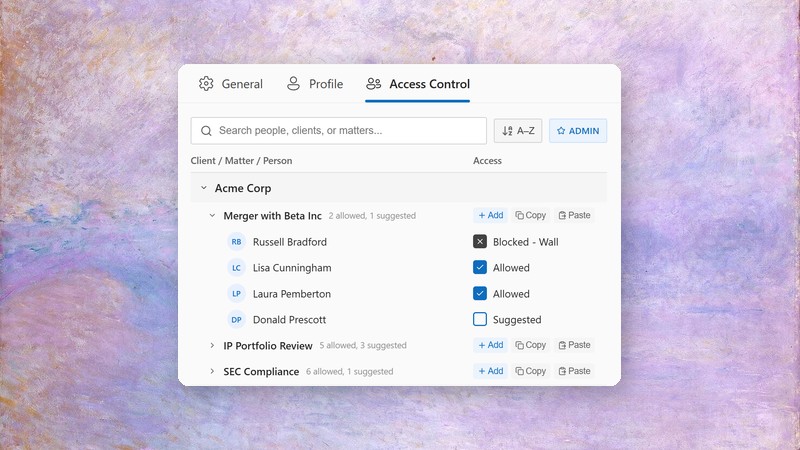
Matter-Level Access Control: Scaling AI Confidentiality to the Entire Firm
How per-matter user lists, intelligent suggestions, and ethical wall integration make enterprise-wide AI deployment possible without compromising confidentiality.
Read More →
Client Confidentiality and AI: A Risk Framework
How the three duties of client confidentiality — secrecy, security, and loyalty — map to concrete AI risks, and how Clevermore's architecture addresses each one.
Read More →
Automatic Timekeeping With Clevermore in Outlook
AI-generated time entries with accurate narratives, pulled directly from your Outlook activity — then synced to your calendar so you never lose another billable hour.
Read More →